Everything you need to run your fleet
Real screens from the real platform. Click any of them to see the detail.
Track & locate
GPSTrack five vehicles or five thousand
Your entire fleet on one live map — searchable, filterable by group, with every asset's speed, location, fuel, and driver one glance away.
One click from “where is it?” to “how is it?”
Select any vehicle on the live map to see its speed and heading, live engine readings — voltage, coolant temp, fuel, DEF — and its latest trip, without leaving the map.
Replay any trip, stop by stop
Every trip is recorded: the route, each stop, speed against the posted limit, fuel used, and idle time. Answer “where was the truck Tuesday?” with certainty.
The box that reads the engine
Plug-in or hardwired, the whereQube family turns any truck into a data source: location, fault codes, fuel, odometer, and engine hours, with ELD built in.
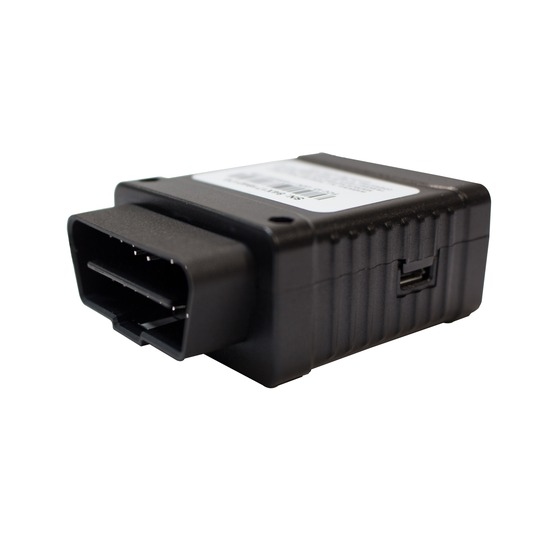
Plug in and drive
- Plugs into the OBD-II port
- Light and medium duty
- VIN, odometer, fuel, engine hours
- Fault codes as they happen
- Driver behavior detection
- Bluetooth sensor gateway
- ELD compliance built in
- Installs in a minute, no tools
Hardwired for heavy duty
- Hardwired to J1939 or OBD-II
- Heavy duty and mixed fleets
- VIN, odometer, fuel, engine hours
- Fault codes as they happen
- Driver behavior detection
- Bluetooth sensor gateway
- ELD compliance built in
- In-cab buzzer alerts
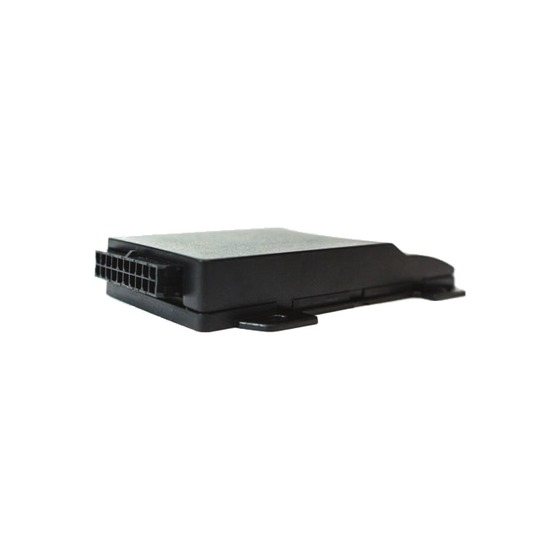
Sealed and hardwired for the outdoors
- IP68 sealed housing
- Two wires to install
- Equipment, trailers, older trucks
- Ignition and running-state detection
- Driver behavior detection
- One-wire temperature sensors
- Input and two outputs for relays
- External battery voltage alerts
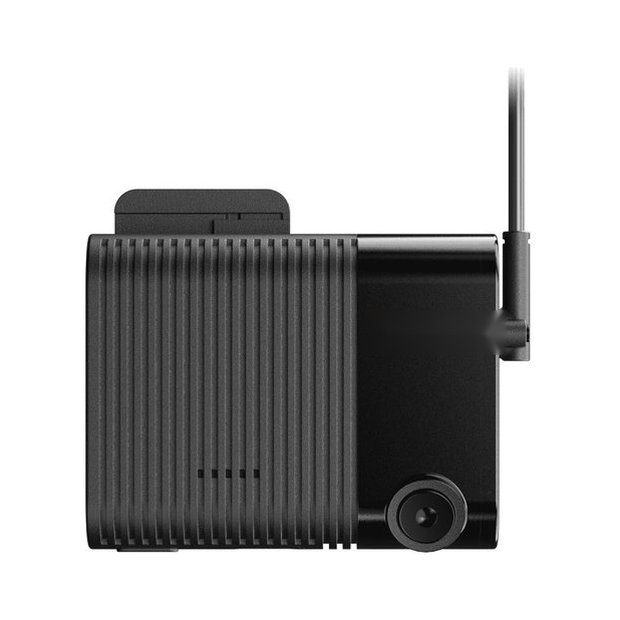
Telematics with cameras
- Everything the OBD units read
- Road and cabin cameras
- Key-on still for driver ID
- See the Dash Cameras page
Maintenance & health
MNTEvery vehicle gets a grade
A 0–100 health score for every asset — built from maintenance status, live sensor readings, fault-code history, and service recency — next to fully decoded J1939 fault codes with plain-English descriptions.
The whole service story, per vehicle
Upcoming service predicted from this truck's real pace — due in 1,500 miles, about 19 days at its current usage — above the full service history with costs, and a health score that reflects it all.
Work orders that know the vehicle
Due dates, meters, and priority up top; a step-by-step inspection checklist; and every fault code the vehicle has thrown since its last service — decoded — right on the work order.
Driver safety & cameras
SFT · CAMSee what actually happened
Road- and cabin-facing clips with time, location, and speed burned in. Coach from the footage, not the phone call.
Make safe driving visible
Every driver ranked by safety score, with the safety, speed, and attention subscores that explain the number. Nobody argues with the leaderboard.
A score every driver can act on
One driver, one page: overall score, fleet rank, events per 1,000 miles, and the subscores behind it — with the video of every scored event right below.
Sites, alerts & compliance
SITE · ALRT · ELDKnow what’s on site — and for how long
Draw a boundary around any yard or job site and MetraFleet tracks every arrival, departure, and hour on site automatically — with site notifications that alert the right people the moment a vehicle arrives, leaves, or overstays.
Alerts that say exactly what you need
Pick a trigger — site entry or exit, time on site, maintenance due, a sensor threshold — choose who gets emailed or texted, and customize the message with live placeholders.
Every driver’s clock, one board
Live duty status for the whole fleet — who’s driving, on duty, or in the sleeper — with each driver’s remaining drive, break, shift, and cycle time color-coded as limits approach.
Dashboards, assets & reporting
DASH · AST · RPTThe morning view you actually want
Build your own dashboard from 18 widgets. Here: a fleet summary, recent activity, and which vehicles wasted the most fuel idling this week.
Your whole fleet in one table
Odometer, engine hours, fuel level, current status, and live location for every asset — sortable, searchable, and one click from the full detail page.
Everything about one vehicle, one page
Live location, odometer and hours, fuel level, engine health readings, recent trips, and one-click reports — the single source of truth for every asset.
From question to CSV in seconds
Day-by-day odometer, engine hours, fuel, idle time, and MPG for every asset — filtered how you want, exported with one click.
More on the platform
Beyond the screens above, MetraFleet covers the operations and compliance work that keeps a fleet legal and moving.
ELD compliance
Automatic hours-of-service logging, electronic DVIRs, and DOT-ready inspections — FMCSA compliance built into the same platform your drivers already use.
Tire pressure & sensors
Bluetooth tire-stem sensors report pressure and temperature per tire, relayed with GPS — so a soft tire is a low-pressure alert, not a roadside blowout.
Scorecards on your terms
Decide what a good driver looks like for your fleet. Weight safety, speed, attention, and maneuvering your way, choose which events count, set the scoring window and the minimum miles, and the ranking follows your rules, not ours.
Driver Identification
Shared trucks don't have to mean shared blame. The dash camera identifies the driver at key-on and assigns the trip automatically, so scorecards and coaching follow the person, not the vehicle. Drivers enroll from the mobile app, and it's switched on per fleet.
Engine fault codes, decoded
Every fault code is read off the bus, decoded against a 12,000-code library, and can fire an alert the moment it appears, so a check-engine light becomes a work order instead of a surprise at the shop.
Reports that come to you
Save any report with its filters and columns, schedule it, and it arrives by email as a PDF or Excel file. Daily usage, weekly scorecards, monthly fuel, without anyone logging in.
Speeding against posted limits
Speed limits are attached to every reading, so reports show time and miles over the limit per driver, not just a raw top speed.
Fuel and idle, by the day
Fuel used, idle time, and idle fuel are aggregated for every asset every day, so the cost of a truck running in a parking lot is a number, not a guess.
Maintenance from real mileage
Service intervals advance from device-reported odometer and engine hours, so preventive maintenance comes due on what the truck actually did, with nothing typed in.
Mobile
APPNative iOS and Android — the same live data your dispatchers see, wherever you are.
The live map, in your pocket
The same real-time fleet view on iOS and Android — clustered when you're zoomed out, precise when you're not.
Check any truck from anywhere
Current location, live odometer, hours, and status for any asset — from the parking lot or the airport.
Events, flagged where they happened
A speeding event pinned to the exact spot — 72 in a posted 60 — with time, heading, and road. The full trip map, on your phone.
Your key clips, saved
Star the footage that matters — coaching moments, incidents, disputes — and share it with your team straight from the app.
See it on your own fleet
Thirty minutes, no slides. We'll run MetraFleet against your vehicles and your devices.